

.NET 6 实现敏感词过滤
创始人
2025-05-29 14:19:12
一、什么是敏感词过滤?
敏感词过滤是一种处理网络内容的技术,可以检测和过滤出网络中的敏感/违禁词汇。它通过给定的关键字或字符串,判断网络内容是否包含某些敏感信息,从而防止违反法律法规的信息流通。
通常,可以使用两种方法来过滤敏感词:
- 黑名单过滤:即定义一个黑名单,将所有敏感词择记录在其中,然后对输入的文本进行对比,如果发现有敏感词,就将其过滤掉。
- 白名单过滤:即定义一个白名单,将所有不敏感的词汇记录在其中,然后对输入的文本进行对比,如果发现有不在白名单中的词汇,就将其过滤掉。
二、ToolGood.Words是什么?
ToolGood.Words是一款高性能非法词(敏感词)检测组件,附带繁体简体互换,支持全角半角互换,获取拼音首字母,获取拼音字母,拼音模糊搜索等功能。
ToolGood.Words的源码网站:ToolGood.Words源码网站
三、在Visual Studio中安装ToolGood.Words
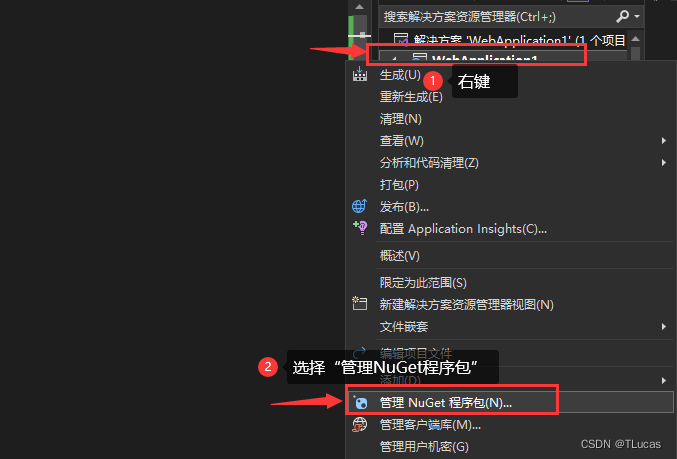
3.1、右键项目解决方案,选择“管理NuGet程序包”,如下图所示:
3.2、切换到“浏览”选项卡,搜索“ToolGood.Words”并安装:

安装完之后最好重新编译生成项目
四、创建“subContentCheck”类
敏感/违禁词汇因特殊内容不便上传,可自行在网站上查找
using Microsoft.AspNetCore.Http;
using Microsoft.CodeAnalysis.Text;
using System.Collections;
using ToolGood.Words;
using IHostingEnvironment = Microsoft.AspNetCore.Hosting.IHostingEnvironment;namespace WebApplication1
{/// /// 提交的内容敏感违禁词检查类/// public class subContentCheck{/// /// 本地静态文件地址路径/// private IHostingEnvironment _hostingEnv;/// /// 敏感词库/// private string dictionaryPath = "/sensitiveWords/sensitiveWords.txt";/// /// 敏感链接、网站、网址库/// private string urlsPath = "/sensitiveWords/IllegalUrls.txt";/// /// 保存敏感词组/// public string[] Words { get; set; }/// /// 一个参数的构造函数/// /// 本地静态文件地址路径public subContentCheck(IHostingEnvironment hostingEnv){_hostingEnv = hostingEnv;InitDictionary();}/// /// 初始化内存敏感词库/// public void InitDictionary(){Words = new string[] { };string wordsPath = _hostingEnv.WebRootPath + dictionaryPath;string urlPath = _hostingEnv.WebRootPath + urlsPath;string[] readAllWords = System.IO.File.ReadAllLines(wordsPath, System.Text.Encoding.UTF8);string[] readAllurl = System.IO.File.ReadAllLines(urlPath, System.Text.Encoding.UTF8);//由于数组是非动态的,不能进行动态的添加,所有先将它转成list,操作ArrayList arrayList = new ArrayList(Words.ToList());if (readAllWords.Length > 0 || readAllurl.Length > 0){if (readAllWords.Length > 1){foreach (string itemWords in readAllWords){string[] allSplitWords = itemWords.Split('|');foreach (string itemSplitWords in allSplitWords){if (!string.IsNullOrEmpty(itemSplitWords)){arrayList.Add(itemSplitWords);}}}}else{if (readAllWords.Length == 1){string[] allSplitWords = readAllWords[0].Split('|');foreach (string itemSplitWords in allSplitWords){if (!string.IsNullOrEmpty(itemSplitWords)){arrayList.Add(itemSplitWords);}}}}if (readAllurl.Length > 1){foreach (string itemUrls in readAllurl){string[] allSplitUrls = itemUrls.Split('|');foreach (string itemSplitUrls in allSplitUrls){if (!string.IsNullOrEmpty(itemSplitUrls)){arrayList.Add(itemSplitUrls);}}}}else{if (readAllurl.Length == 1){string[] allSplitUrls = readAllurl[0].Split('|');foreach (string itemSplitUrls in allSplitUrls){if (!string.IsNullOrEmpty(itemSplitUrls)){arrayList.Add(itemSplitUrls);}}}}}//我们在将list转换成String[]数组 Words = (string[])arrayList.ToArray(typeof(string));}/// /// 过滤替换敏感词/// /// 需要过滤替换的原内容/// 敏感词替换的字符;默认替换为‘*’/// 返回状态码;为空则表示传入的内容为空;“0”:设置违禁词时发生错误;“1”:敏感内容替换时发生错误;“2”:需要替换的文本内容为空;其余则返回替换成功的字符串内容 public string FilterWithChar(string sourceText, char replaceChar = '*'){if (!string.IsNullOrEmpty(sourceText)){string result = "";WordsSearch wordsSearch = new WordsSearch();try{wordsSearch.SetKeywords(Words);}catch (Exception ex){result = "0";return result;}try{result = wordsSearch.Replace(sourceText, replaceChar);return result;}catch (Exception ex){return result = "1";}}else{return "2";}}}
}
五、写API接口
///
/// 进行敏感词脱敏
///
/// 需要脱敏的文本内容
/// 六、前端封装JS方法
/*** 敏感词/违禁词替换* @param {string} requestUrl 请求后端接口的路径* @param {string} sourctText 需要进行替换的内容* @param {string} boxid 将替换成功之后的内容赋值的元素容器id属性名* @param {object} layui Layui实例* @returns 替换之后的文本内容*/
function sensitive_words_replace(sourctText, boxid, layui) {let resultStr = "";//let url = ["/Home/sensitive_words_replace", "/Home/sensitive_words_replace1", "/Home/sensitive_words_replace2"];$.ajax({url: "/Home/sensitive_words_replace2",//请求后端接口的路径dataType: "JSON",type: "POST",data: {"sourctText": sourctText},success: function (res) {let resCode = res.code;let resMsg = res.msg;if ((resCode == "210" || resCode == 210) || (resCode == 220 || resCode == "220") || (resCode == 230 || resCode == "230") || (resCode == 240 || resCode == "240") || (resCode == 260 || resCode == "260")) {//返回数据后关闭loadinglayer.closeAll();resultStr = res.resultStr;layui.layer.alert(resMsg, { icon: 5, title: "温馨提示", closeBtn: 0 });} else if (resCode == 200 || resCode == "200") {resultStr = res.resultStr;$("#" + boxid).val(resultStr);//返回数据后关闭loadinglayer.closeAll();}},error: function (error) {//返回数据后关闭loadinglayer.closeAll();layui.layer.alert(error, { icon: 5, title: "温馨提示", closeBtn: 0 });}});return resultStr;
}
相关内容
热门资讯
西安足球公益活动点亮夏日公园
6月13日下午,以“科学健身指导、运动促进健康”为主题的2026年西安市全民健身公益大讲堂足球进公园...
南向资金今日净卖出超85亿港元...
5月6日消息,南向资金今日净卖出约85.65亿港元。其中,盈富基金、腾讯控股分别遭净卖出约37.39...
杭电股份:富春江通信集团拟减持...
5月6日消息,杭电股份公告称,股东浙江富春江通信集团有限公司因企业经营发展需要,计划自2026年5月...
现货白银日内涨幅扩大至6%
5月6日消息,现货白银日内涨幅扩大至6%,报77.2美元/盎司。(广角观察)
泰国批准290亿美元投资计划
5月6日消息,泰国投资促进委员会宣布,已批准六个总价值9580亿泰铢(约合290亿美元)的重大项目,...