

生成自己的rosbag运行轨迹文件用EVO绘制
创始人
2025-05-29 16:47:36
生成自己的rosbag运行轨迹文件用EVO绘制
- 一、EVO安装
- 二、rosbag轨迹生成
- 2.1 修改laserMapping.cpp代码
- 2.2 运行roslaunch+rosbag
- 2.3 EVO绘制
一、EVO安装
pip install evo --upgrade --no-binary evo
依赖问题自行添加解决
二、rosbag轨迹生成
2.1 修改laserMapping.cpp代码
找到文件改代码
(我自己的)代码路径:/home/flycar/aloam_ws/src/A-LOAM/src/laserMapping.cpp
-----------源代码------------nav_msgs::Odometry odomAftMapped;odomAftMapped.header.frame_id = "/camera_init";odomAftMapped.child_frame_id = "/aft_mapped";odomAftMapped.header.stamp = ros::Time().fromSec(timeLaserOdometry);odomAftMapped.pose.pose.orientation.x = q_w_curr.x();odomAftMapped.pose.pose.orientation.y = q_w_curr.y();odomAftMapped.pose.pose.orientation.z = q_w_curr.z();odomAftMapped.pose.pose.orientation.w = q_w_curr.w();odomAftMapped.pose.pose.position.x = t_w_curr.x();odomAftMapped.pose.pose.position.y = t_w_curr.y();odomAftMapped.pose.pose.position.z = t_w_curr.z();pubOdomAftMapped.publish(odomAftMapped);-----------添加代码------------//***add evo***////根据自己的文件存放位置修改路径和文件名std::ofstream pose1("/home/flycar/aloam_ws/src/A-LOAM/data1/college.txt", std::ios::app);pose1.setf(std::ios::scientific, std::ios::floatfield);//保存结果的精度,可调pose1.precision(6);//static double timeStart = odometryBuf.front()-> header.stamp.toSec();//auto T1 = ros::Time().fromSec(timeStart);pose1 << odomAftMapped.header.stamp << " "<< odomAftMapped.pose.pose.position.x << " "<< odomAftMapped.pose.pose.position.y << " "<< odomAftMapped.pose.pose.position.z << " "<< odomAftMapped.pose.pose.orientation.x << " "<< odomAftMapped.pose.pose.orientation.y << " "<< odomAftMapped.pose.pose.orientation.z << " "<< odomAftMapped.pose.pose.orientation.w << std::endl;pose1.close();//***add evo***//
2.2 运行roslaunch+rosbag
编译后运行
catkin_make
source devel/setup.bash
roslaunch aloam_velodyne aloam_velodyne_VLP_16.launch
新建终端
rosbag play college.bag
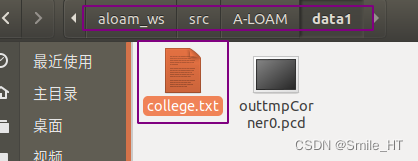
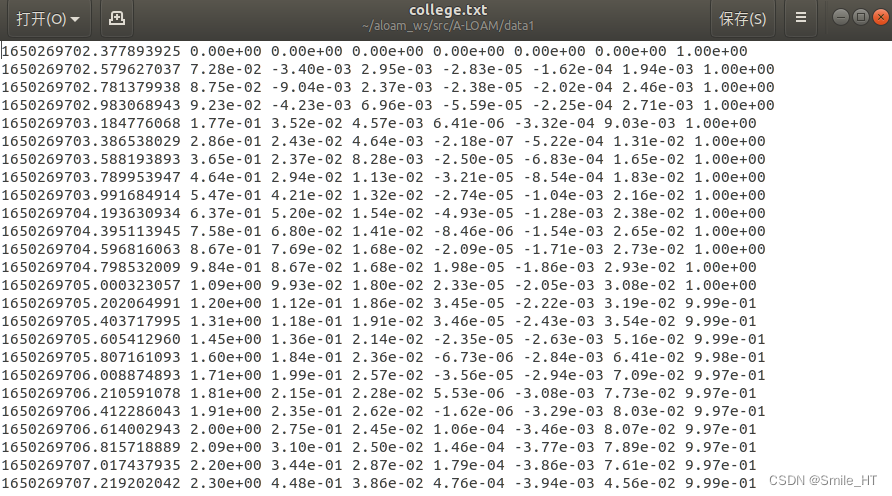
就可以在路径下看到txt文件的生成,存放了tum格式的轨迹,包括时间戳,位置,姿态四元数。这里用的tum格式。
2.3 EVO绘制
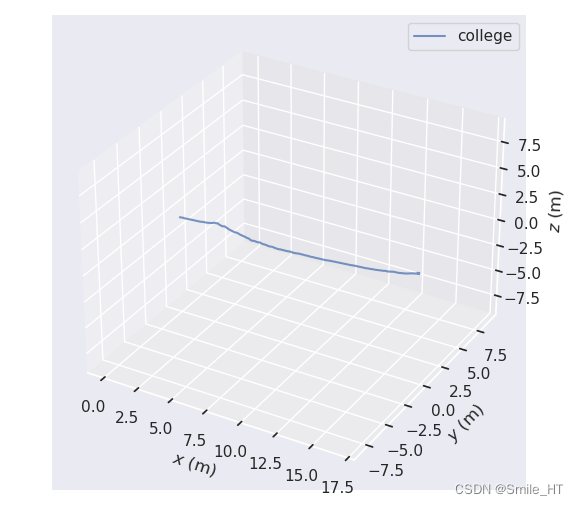
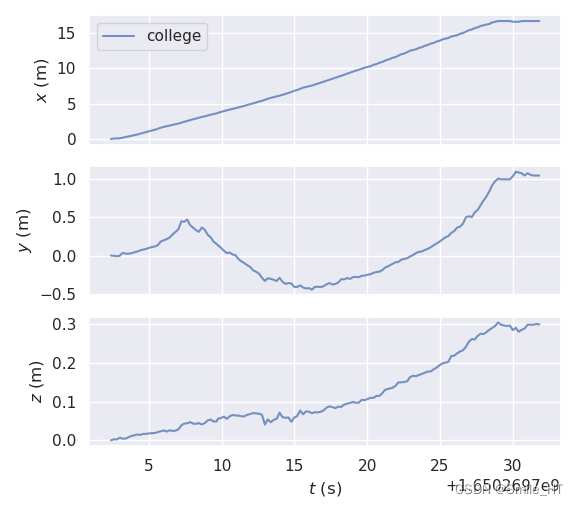
cd /home/flycar/aloam_ws/src/A-LOAM/data1evo_traj tum college.txt -p

 其他命令
其他命令
指标:
evo_ape- 绝对姿势错误
evo_rpe- 相对位姿误差
工具:
evo_traj- 用于分析、绘制或导出一条或多条轨迹的工具
evo_res- 用于比较一个或多个结果文件的工具 evo_ape或者 evo_rpe
evo_fig-(实验性)用于重新打开序列化图的工具(保存为 --serialize_plot)
evo_config- 全局设置和配置文件操作工具
相关内容
热门资讯
原创 主...
广泛期小细胞肺癌侵袭性强、进展迅速,化疗仍是治疗基石。然而超过50%的患者面临化疗诱导的骨髓抑制,白...
一周内三位基金经理相继变动:有...
本报(chinatimes.net.cn)记者栗鹏菲 叶青 北京报道 近期,公募行业接连出现三起基金...
原创 摆...
#字节跳动加量采购国产芯片 #行业内部消息重磅曝光,字节跳动新一轮数据中心算力采购计划落地,企业正与...
多重利空叠加 法国央行大幅下调...
当地时间16号,法国央行发布最新宏观经济展望报告,大幅下调本国2026年经济增长预期,全年GDP增速...
原创 A...
大家好,这里是全球脉冲。 全球科技巨头对AI能否担任CEO的态度呈现明显差异,OpenAI的奥特曼表...